

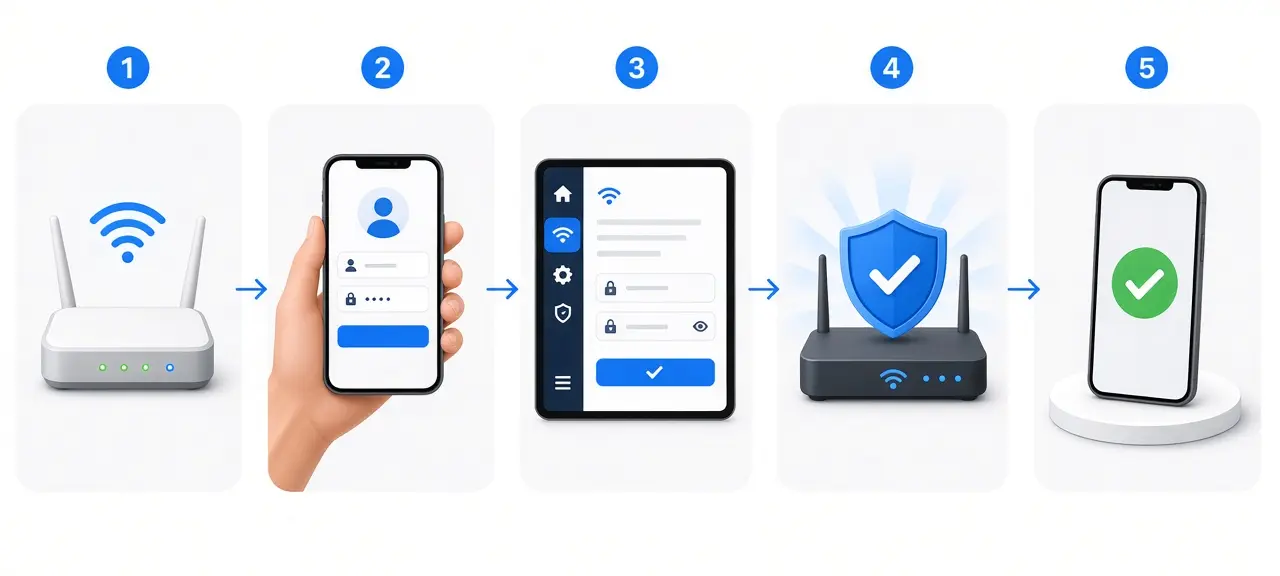
To change your Viettel Wi-Fi password, open viettel.vn/quan-ly-wifi, sign in with the account linked to your internet contract, find your Wi-Fi network, tap Đổi mật khẩu (Change password), type the new password and confirm. The other route is the modem's admin page at 192.168.1.1, using the admin login on the modem label. The My Viettel app that most older guides use closed on October 1, 2026, so those steps no longer work. Neither method needs the old Wi-Fi password. Both work on a phone.
Change your Viettel Wi-Fi password on viettel.vn
The fastest way to change password wifi Viettel today is the Quản lý modem wifi (Manage Wi-Fi modem) page at viettel.vn/quan-ly-wifi. It works in any phone or laptop browser. You sign in with the viettel.vn account tied to the internet contract, and each Wi-Fi network gets its own Đổi mật khẩu button. No modem label needed.
- Open viettel.vn/quan-ly-wifi in Chrome, Safari or any browser.
- Sign in with the viettel.vn account linked to the internet contract, following the prompts on the page.
- Wait for the modem details to load. If the account has more than one internet line, pick the one at this address.
- Find your network by its Tên wifi (Wi-Fi name) and tap Đổi mật khẩu next to it.
- Type the new password, type it again if the page asks, and confirm.
- If a code arrives by SMS, type it into the page. Never read it out to anyone.
The page is in Vietnamese; Google Lens can translate it on screen, and our router login guide translates its other buttons. It reaches your modem through Viettel's systems, so it works away from home while the modem is on. We haven't recorded the password dialog from a signed-in account, so its wording or code step may differ.
Does Viettel Tammi change the Wi-Fi password?
We haven't confirmed a Viettel Tammi Wi-Fi password option. VOV reported on August 6, 2026 that Tammi manages fixed internet and can turn the Wi-Fi modem on or off remotely. That report doesn't mention passwords. Tammi is also in Vietnamese only. Until Viettel says otherwise, use viettel.vn for password changes.
Does My Viettel still change the Wi-Fi password?
No. People searching for the My Viettel app Wi-Fi menu are following guides written before the app closed. Its Google Play listing says My Viettel would "close on October 1st, 2026" and that its services move to the Viettel Tammi app on that date. The old path, Internet/TV/PSTN, then Quản lý Modem Wifi, then Đổi mật khẩu, is gone with it.
Most Vietnamese guides ranking for this search, including one updated in July 2026, still describe that path. Here is what replaces it.
| Old way | Use now |
|---|---|
| My Viettel, Quản lý Modem Wifi, Đổi mật khẩu | viettel.vn/quan-ly-wifi, Đổi mật khẩu next to each network |
| My Viettel, restart modem | viettel.vn/quan-ly-wifi, Khởi động lại modem |
| 192.168.1.1 admin page | No change: same address, same label login |
Change the Wi-Fi password at 192.168.1.1
On the admin page, the Wi-Fi password is under the wireless settings, often labeled Wireless, WLAN or WiFi, then Security. The box is called Password, Pre-Shared Key or WPA key. Viettel has installed modems from several makers, so menu names vary.
A few points save trouble on this route:
- Use a LAN cable if you can. Saving drops every Wi-Fi connection, including yours.
- Don't touch the administrator password box. Some guides point to a field like "Modify administrator password", which changes the admin login, not the Wi-Fi.
- A dual-band modem may show the 2.4 GHz and 5 GHz settings on separate tabs, each with its own password box.
Menus for TP-Link and other routers are in our guide on how to change your Wi-Fi password on any router.
Change both bands and every Homewifi unit
Viettel's dual-band modems broadcast two networks, one on 2.4 GHz and one on 5 GHz, and each has its own password. Change both. If you change only one, any device on the other network stays connected with the old password.
Homewifi is Viettel's mesh set of 2 to 3 units, according to viettel.vn. Check the network names on your phone. If the upstairs unit shows its own Wi-Fi name, change its password there too. A router you bought and plugged in behind the Viettel modem runs its own network, so change that one in its own app or admin page.
If your landlord holds the Viettel contract
Both viettel.vn and Tammi need the account on the internet contract, and in rentals that account usually belongs to the landlord. Ask the landlord to make the change, or ask permission to use the label login at 192.168.1.1. In a shared house, warn the other tenants first.
Type SMS codes only into viettel.vn. If a caller claiming to be from Viettel asks you to read one out, hang up.
Forgot the Viettel Wi-Fi password? Set a new one, don't reset
You don't need the old password to set a new one, so there's no reason to reset wifi Viettel equipment to factory settings. Sign in to viettel.vn/quan-ly-wifi, or plug a cable into the modem and open 192.168.1.1 with the label login. Both let you type a fresh password without knowing the current one.
A factory reset wipes the internet settings Viettel installed, and the line may stay down until Viettel sets it up again. Call 18008119 before you press the reset button, and read how to reset a router to see what a reset erases.
After you change the Viettel Wi-Fi password
After you change the Viettel Wi-Fi password, every phone, laptop and TV on the network drops off and needs the new password. On each one, forget the old network and join it again. Two Viettel cases need extra care:
- VOV's August 2026 report lists Home Camera among the services on Tammi. A Wi-Fi camera keeps trying the old password, so re-add Wi-Fi in the app you use to manage the camera.
- A TV box on Wi-Fi needs the network chosen again in its own settings. A box on a cable isn't affected.
A day later, see who is on your Wi-Fi to confirm no unknown device got back in. If one did, block that device on the admin page.
Viettel Wi-Fi password change problems
Most failed Viettel password changes come from the closed app, the wrong account or a missed network. Admin page login errors are in the router login guide. This table lists only problems with the password change itself, with the fix for each.
| Problem | Likely cause | Fix |
|---|---|---|
| A guide's My Viettel steps don't work | The app closed on October 1, 2026 | Use viettel.vn/quan-ly-wifi |
| viettel.vn shows no modem | The account isn't the one on the internet contract | Sign in as the contract holder |
| The page won't save the password | Too short, or it has Vietnamese accents or spaces | Use 8 or more plain characters |
| Someone still gets online | Only one band or one Homewifi unit was changed | Change every network name you can see |
| Camera went offline | It still has the old password | Re-add Wi-Fi in the camera app |
| No account and no label login | Contract details unknown | Call 18008119 with the contract holder |
Frequently asked questions
Can I change my Viettel Wi-Fi password on my phone?
Yes. To change your Viettel Wi-Fi password on a phone, open viettel.vn/quan-ly-wifi in the phone's browser and sign in with the contract account. That works on mobile data too. The 192.168.1.1 admin page also opens on a phone, but only while it's connected to the home Wi-Fi.
How long should a Viettel Wi-Fi password be?
WPA2 needs at least 8 characters, and modems reject anything shorter. Aim for 12 or more, mixing words and numbers. Skip Vietnamese accents, because some phones and smart devices type them differently. The WPA2 limit is 63 characters, so a short sentence you can say out loud to guests works well.
Do I need to call Viettel to change my Wi-Fi password?
No, as long as you have the contract account for viettel.vn or the admin login from the modem label. Call 18008119, Viettel's fixed-line support number, only if you have neither. Have the contract holder's name and phone number ready, and bring a Vietnamese speaker if you can.
Can I change the Viettel Wi-Fi name too?
Yes, on the admin page. The network name (SSID) box sits in the same wireless settings as the password. Keep the old name if you can. Devices then only ask for the new password. A new name makes every device treat it as an unknown network, so you rejoin each one by hand.





