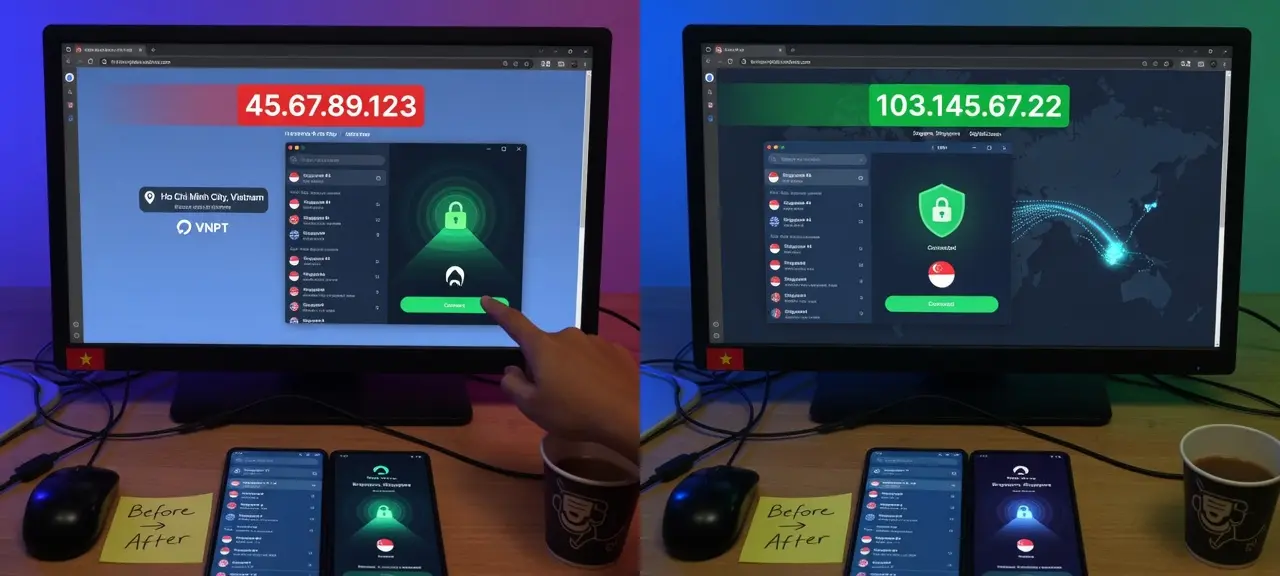
Yes. A working VPN hides your IP address from the websites and apps you use, because they see the VPN server's IP instead of the one your ISP assigned. So the answer to "what is my IP address with a VPN on" is the server's address, not yours. The VPN provider still sees your real IP, and your ISP still sees that you connect to a VPN server. IPv6, split tunneling or a dropped connection can still undo it. To see what websites see right now, check your IP with the VPN on and compare it with your normal IP.
Who can still see your real IP when a VPN is on?
Two parties always see your real IP with a VPN on: your ISP, because it assigned the address, and the VPN provider, because your device connects to its server. Websites and apps see only the server IP, as long as the tunnel covers them. The DNS resolver and WebRTC are where leaks usually happen.
| Party | Sees your real IP? | What it sees instead | Notes |
|---|---|---|---|
| Websites and apps | No, if the tunnel covers that app | The VPN server's IP, its network owner (ISP or ASN), the server's location | A logged-in account still tells the site who you are. |
| Your ISP (home broadband or mobile carrier) | Yes, it assigned the address | That you connect to one VPN server IP, when, and how much data moves | It can't read the sites or content inside the tunnel. |
| The VPN provider | Yes | Your real IP plus the sites you reach through its server | Trust moves from your ISP to the VPN company. |
| Wi-Fi owner (café, office, hotel) | Your local IP and your device | Encrypted traffic to one server | Other people on the network can't read it either. |
| DNS resolver | Depends on setup | Every domain you look up | If the VPN app sets no resolver, your ISP's may still get the lookups. |
| People in a video call or P2P app | Possibly, through WebRTC | Candidate addresses your browser offers | Browser settings can limit this. |
A VPN changes who sees your IP. It doesn't erase the IP, so this page avoids the word "anonymous". Does a VPN hide your IP from your ISP? No. It hides the content, not the connection. VPNs are legal in many countries, rules differ between them, and an act that is illegal without a VPN stays illegal with one. The guide on hiding your IP address covers what a hidden IP still gives away and whether hiding it is legal.
What is my IP address with a VPN on?
With a VPN on, your IP address is the address of the VPN server you connected to, and every field that describes it should point to that server's network. If CheckIP still shows your home ISP's name, the VPN isn't covering your browser.
- IP address. This is your VPN IP address as far as any website knows. Many customers share it at once, so it sometimes lands on spam lists.
- ISP or organization. This is the most telling field. It should name a hosting company or the VPN provider, not Comcast, Verizon or whichever ISP you pay. If you see your own ISP, the tunnel isn't working for this browser.
- ASN. The autonomous system number names the network behind the IP. A VPN server's ASN belongs to a data center, a home line's to a consumer ISP.
- Country and city. This is "my VPN location", the answer to "where does my VPN say I am". It comes from a GeoIP database that maps IP blocks to places, not from the server's GPS position.
The city often differs from the one you picked in the VPN app, because each GeoIP database places server IPs on its own. To see the spread, compare six location sources for the same IP: IPinfo.io, MaxMind, IP2Location, IPGeolocation.io, DB-IP and Cloudflare.
How to check that your VPN hides your IP
To check your VPN IP address, record your normal IP and ISP with the VPN off, turn the VPN on, and confirm that the IP, ISP and ASN all change. Then test split tunneling and the kill switch, the two settings that most often undo it.
- Turn the VPN off. Open CheckIP and write down the IP and ISP. This is your baseline.
- Turn the VPN on and reload. The IP and the ISP name must both change. If your home ISP's name is still there, the VPN isn't running for this browser.
- Paste the new IP into IP lookup to read its ASN. This is a simple VPN lookup: the ASN should belong to a hosting network or a VPN company. Then run the location check from the previous section.
- Test split tunneling. An app excluded from the tunnel keeps using your real IP. Open CheckIP in a second browser and compare, then read the excluded-apps list in the VPN app's settings.
- Test the kill switch. With the VPN on, turn Wi-Fi off for a few seconds and back on, or switch servers, and reload CheckIP during the reconnect. If your home IP appears even once, the kill switch is off.
On Android, a VPN set up in system settings can stay on permanently. Google's Android Help says to open Settings, then Network & internet, then VPN, tap the Settings icon next to the VPN and turn on Always-on VPN. Google adds that "If you've set up a VPN through an app, you won't have the always-on option," so an app VPN needs its own kill switch. Repeat steps 2 to 5 after every server or network change.
DNS and WebRTC leaks, explained
A leak means part of your traffic skips the tunnel while sites see the VPN IP. A DNS leak exposes the domains you visit to your ISP. A WebRTC leak can hand your real IP to a site that uses browser calls. An IPv6 leak happens when the tunnel carries only IPv4. CheckIP doesn't run DNS or WebRTC leak tests.
In a DNS leak, pages load through the VPN server, but the lookups that turn domain names into addresses still go to your ISP's resolver. The ISP gets a list of every domain you open. Common causes are DNS set by hand on the device or router, a VPN app with no resolver of its own, and IPv6 DNS outside the tunnel. You can check which DNS server you're using with the commands in our DNS guide. With the VPN on, it should be the VPN's resolver or one you chose on purpose.
WebRTC is the browser technology behind video calls. It collects your device's addresses to set up a direct connection. The IETF's RFC 8828 warns that with a VPN that doesn't route all traffic, WebRTC can discover your ISP's public address as well as the VPN's. Steps to limit it are in the IP hiding guide above.
An IPv6 leak is the simplest of the three. If your device has an IPv6 address and the VPN only tunnels IPv4, sites that support IPv6 reach you over your ISP's address. Our page on why IPv6 can leak outside the tunnel explains the routing.
VPN on but CheckIP shows something odd? Fixes by symptom
Most odd VPN results have one of three causes: the tunnel misses the browser, it covers IPv4 only, or GeoIP databases disagree about where the server is. Match what you see to the likely cause and the fix in the table.
| What you see | Likely cause | What to do |
|---|---|---|
| Your home ISP name still shows | VPN not connected, or the browser is excluded by split tunneling | Reconnect, check the excluded-apps list, reload |
| The IPv4 address changed, but your ISP's IPv6 address still shows | The tunnel covers IPv4 only | Turn on the app's IPv6 setting or leak protection |
| Country is right, city is not the one you picked | GeoIP databases place server IPs differently | Compare the six location sources; nothing is broken |
| A different country from the server you picked | The IP block is registered elsewhere, or a database is out of date | Compare sources; if all of them disagree with the app, ask the VPN provider |
| The IP changes on every reload | The provider rotates or load-balances server IPs | Normal for shared servers |
| Captchas everywhere, or "access denied" | The shared server IP is on spam or abuse lists | Check the IP with CheckIP's blacklist tool; switch servers |
| Pages load very slowly | Distance to the server, or a crowded server | Run CheckIP's speed test and ping test with the VPN on and off |
What is my VPN? How to see which VPN is connected
To find your VPN, open the VPN page in your system settings. It lists every VPN profile, including ones added by apps, and marks the connected one. On a work device, ask your IT team before you turn it off.
- Windows 11: open Settings, then Network & internet, then VPN. Microsoft Support says the active connection shows "Connected" under its name, and the taskbar network icon shows a small blue shield while you're connected to a recognized VPN.
- Android: open Settings, then Network & internet, then VPN, or search for "VPN" if your phone maker renamed the menu. Google's help page says you'll see "VPN on" while a connection is active.
- iPhone and iPad: open Settings, then General, then VPN & Device Management, where VPN configurations and installed profiles are listed.
- Mac: open System Settings and look for VPN in the sidebar.
If no VPN is listed but CheckIP shows an IP that isn't your ISP's, something else is routing your traffic. Usually it is a proxy, iCloud Private Relay or a company gateway.
Frequently asked questions
Does a VPN hide your IP from your ISP?
No. Your ISP assigned your IP, so it always knows it. With a VPN on, the ISP sees that your device connects to one VPN server address, at what times, and how much data moves. It doesn't see the sites you visit, as long as DNS also goes through the tunnel.
Can a VPN provider see my real IP?
Yes, every time. Your device opens the connection to the provider's server, so the provider sees your real IP and, technically, the sites you reach through it. That is why its data policy matters more than its server count: look for a published, independently audited logging policy.
Does a free VPN hide your IP?
A free VPN hides your IP from websites the same way a paid one does, because the site sees the server IP in both cases. The difference is what the provider does with your data. The FTC's 2018 advice on VPN apps is to research the app before you get it, review its permission requests, confirm it encrypts your information and check whether it shares data with third parties.
Does a VPN give you a new IP every time?
Often, yes. Most VPN servers share a pool of IPs among many users, so reconnecting or picking another server usually gives you a different address. Some providers sell a dedicated IP that stays the same. The IP your ISP assigns at home doesn't change either way.
Is a VPN the same as a proxy?
No. A VPN tunnels traffic from the whole device and encrypts it as far as the VPN server. A proxy usually covers one browser or app, and a plain HTTP or SOCKS proxy encrypts nothing by itself. If you're asking "am I using a VPN or proxy", check the VPN page in your settings first, then the proxy settings of your browser and system.