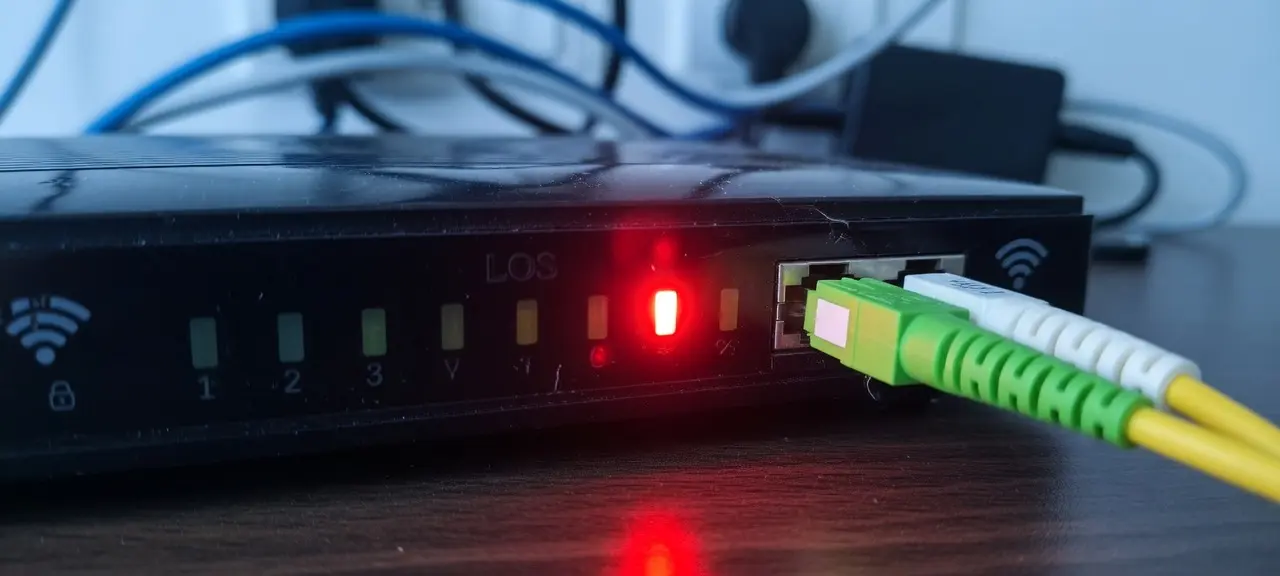
A red LOS (loss of signal) light means your modem or ONT isn't receiving light from your provider's fiber line, so there's no internet until the line is fixed. When you see the LOS light red, the fault is usually outside your home: a cut cable, street works or an area outage. A fiber cable bent or pulled loose indoors is still worth checking first. Restarting the box once is safe. A factory reset won't bring the signal back and wipes the settings your provider installed; our guide to restart vs factory reset explains the difference.
What does the LOS light mean on a fiber modem?
The LOS light shows one thing: whether light is arriving on the fiber line. On most fiber equipment it stays off while the signal is fine and turns red when the ONT (optical network terminal) detects no light from the network. A LOS light red on ONT boxes and on all-in-one gateways means the same thing. Nothing behind that box can reach the internet.
The ONT turns light pulses in the fiber into an Ethernet signal. Some providers mount a separate ONT on the wall; others put the ONT, router and Wi-Fi in one gateway box (see modem vs router). LOS doesn't measure speed or Wi-Fi strength. A slow connection with the LOS light off is a different problem.
LOS light red or blinking: reading the LOS and PON lights
Read the LOS light together with the PON light. The PON light shows whether the ONT has registered with the provider's network, while LOS shows whether light is arriving at all. Solid red LOS points to a dead line. Blinking red LOS means the signal is missing or unstable. A blinking green PON on its own usually means the box is still starting.
| Lights you see | What it usually means | What to do |
|---|---|---|
| LOS off, PON solid green | Normal: the fiber link is up | Look at Wi-Fi, the router or your account; log in to your router to check its settings |
| LOS solid red | No light is reaching the ONT | Run the checklist below, then call your ISP |
| LOS blinking red | Signal missing or unstable; the exact meaning varies by maker | Run the checklist, then call; check your device's manual |
| PON and LOS both blinking red | Fiber not connected, or a fault between your home and the exchange | Check the cable is seated, restart once, report the fault |
| PON blinking green, LOS off | Still registering with the network | Wait up to five minutes |
| LOS off, internet light off or red | Fiber is fine; login, account or configuration problem | Restart once, then call your ISP; it isn't a fiber fault |
The Openreach ONT meanings in the table (solid red LOS, both lights flashing red, up to five minutes for PON to settle) come from connection-technologies.co.uk, a third-party guide. Light names vary: NBN connection boxes in Australia have Optical and Alarm lights instead, according to Belong's support page. If you see the LOS light blinking red on another maker's box, its manual has the final word. People with a single ISP gateway often call this a LOS light red on router hardware; the reading is the same.
Why does the LOS light turn red?
The LOS light turns red when light stops reaching the ONT. Most causes sit on the provider's side of the wall, and only a technician can fix them. A smaller set are inside your home. You can check those by looking, without touching the fiber.
Outside your home (only the ISP can repair these):
- A cable cut during road works or building work
- A tall vehicle, a fallen tree or a storm bringing an overhead line down
- Rodents chewing through the cable
- Planned maintenance, an area outage or a fault at the exchange
Inside your home:
- A cable bent sharply around furniture or crushed under a door
- A connector pulled loose when someone moved the box
- An ONT that failed after a power cut or surge
No provider publishes how often each cause happens. Treat the lists as a checklist, not a ranking.
Five-minute checklist before you call your ISP
Before calling, spend five minutes ruling out an area outage and checking the parts of the line you can see. None of these steps needs tools or opening anything. Either you find a trapped or loose cable, or you call with enough detail that the ISP sends the right person the first time.
- Check for an outage on your provider's status page or app, or ask a neighbor on the same provider. If the whole street is down, report it once and wait.
- Look along the fiber cable from the wall box to the ONT for a sharp bend, a crushed section or a break. Don't unplug or flex it to test it. The Openreach guide on connection-technologies.co.uk says "Never unplug the thin fibre cable," because the connector damages easily.
- Check the connector is fully seated in the ONT. If it has come out or looks broken, stop and call your ISP.
- Restart once: unplug the power for at least one minute, plug it back in and give it up to five minutes. Those timings come from the same Openreach guide; other providers quote shorter waits.
- Still red? Call your ISP. Don't factory reset: it can't repair the line.
Never look into the end of a fiber cable or the port on your ONT. The Fiber Optic Association (FOA) explains that the light is infrared, so "you cannot tell if there is light present by looking at it." Bare fiber ends are sharp glass, and the FOA calls fiber scraps "very dangerous."
What to tell your ISP to get a red LOS light fixed faster
Give the ISP the facts it needs to tell a line fault from a device fault on the first call. Then the agent can book a technician instead of walking you through Wi-Fi settings. Have these ready:
- The account holder's name and account number
- The installation address
- Which lights are on and their colors
- When it started, and whether it followed a storm, a power cut or street works
- Whether neighbors are down and whether you've already restarted
Take a photo of the front of the box in case support asks for one, and write down the ticket number. Your ISP can usually test the line from its end and see whether light reaches your ONT, so don't open the wall box yourself. While you wait, your phone's personal hotspot can carry messages and calls over mobile data.
Red LOS light in Vietnam: Viettel, VNPT and FPT
In Vietnam, a LOS light red on modem boxes from Viettel, VNPT or FPT is reported the same way: call the provider's support line or use its app. Have the contract holder's name and phone number ready, because support looks up the line by those details.
| ISP | Support line | App |
|---|---|---|
| Viettel | 18008119 | Viettel Tammi (My Viettel closed on October 1, 2026) |
| VNPT | 18001166 | My VNPT |
| FPT | 1900 6600 | Hi FPT |
My VNPT, Hi FPT and viettel.vn's Wi-Fi management page all have a restart-modem button, but a remote restart only reaches a modem that's online. With a red LOS light, unplug the power yourself. We haven't confirmed that these lines offer English support, so a Vietnamese-speaking friend or your landlord may need to call.
After the LOS light goes off: check your connection
Once the LOS light is off and PON is solid green, the fiber works again. Check the connection before the technician leaves, because weak Wi-Fi can still make the internet feel broken. Run a speed test close to the router and compare it with your plan. Then check packet loss: a healthy wired connection shows 0%. Your public IP may change after the line comes back, because most home plans use dynamic addresses. The CheckIP home page shows the current one.
Frequently asked questions
Can I fix a red LOS light myself?
Only the parts inside your home. You can free a cable that's bent or trapped, check that the connector hasn't come out of the ONT, and restart the box once. A cut cable outside, a dead ONT or a fault at the exchange needs your ISP. Don't try to clean, cut or rejoin the fiber. That takes a fusion splicer or factory-made connectors and a trained technician.
Will resetting the router fix a red LOS light?
No. A factory reset changes the settings stored on the box. It does nothing to the light coming in on the fiber. On many ISP-installed gateways it also erases the provider's connection settings, so after the line is repaired you may wait for the ISP to set the box up again. Restart instead, and call if the light stays red.
Why did the LOS light turn red after a power cut?
Right after power returns, the ONT has to start up and register with the network again, which takes a few minutes. If the LOS light is still red after about five minutes, the problem is the line or the ONT itself. A storm can cause a power cut and a cable fault at the same time, so ask whether neighbors on the same provider are down too.
What's the difference between the LOS and PON lights?
LOS answers one question: is light arriving on the fiber? PON shows whether the ONT has registered with the provider's network. Normal is LOS off and PON solid green. A flashing green PON with LOS off means registration is in progress. A red LOS means registration can't even start, because there's no signal to register on.
Is a red LOS light dangerous?
The light on the front of the box is an ordinary indicator LED, and it's harmless. A broken fiber cable is a different matter. Keep children and pets away from it, don't bend or pull the damaged section, and leave the exposed ends for the technician to remove when they replace the cable.