

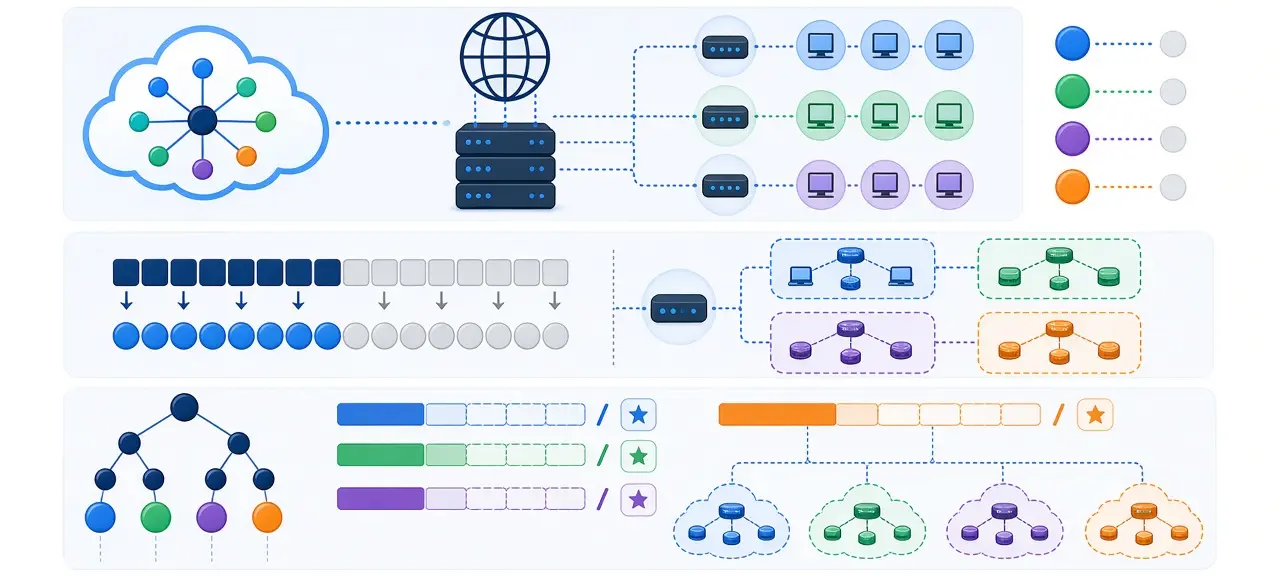
A subnet (short for subnetwork) is a smaller, logically separate piece of a larger IP network. Devices on the same subnet reach each other directly, and traffic for anything outside it goes through a router. That is the short answer to what is a subnet. The subnet mask, such as 255.255.255.0 (written /24), is the setting that tells each device where its own subnet ends. Your home Wi-Fi is almost certainly one /24 subnet with room for 254 devices. The full subnet mask chart from /8 to /32 is further down this page, and every host count in it was checked by script.
What is a subnet in networking?
In networking, a subnet is a range of IP addresses that share the same network prefix and sit on one local segment. Devices inside it deliver packets to each other directly. Anything outside the range is reached through a router, which your computer knows as its default gateway.
A phone area code is a fair comparison: the code says which region you're in, and the rest of the number picks one line. Here is the real version. Your laptop is 192.168.1.20 and your printer is 192.168.1.50. Both sit in the subnet 192.168.1.0/24, so the laptop sends the print job straight to the printer over Wi-Fi. When the same laptop opens a website hosted at 203.0.113.10, that address is outside the subnet. The packet goes to the router at 192.168.1.1 first.
An IPv4 address is 32 bits long, written as four 8-bit numbers called octets (the basics of how IP addresses work are covered in a separate guide). A subnet splits those 32 bits into a network portion, shared by every device on the subnet, and a host portion that is unique to each device. Two addresses in every normal subnet are reserved. The first one (192.168.1.0) is the network address, and the last one (192.168.1.255) is the broadcast address that reaches every device at once.
Networks are split into subnets for four practical reasons:
- Smaller broadcast domains. A broadcast reaches every device on its subnet and stops at the router, so 50 devices hear it instead of 5,000.
- Separate groups of devices. Guest Wi-Fi, security cameras and office PCs can each get their own subnet.
- Rules between groups. A firewall can allow office PCs to reach the camera recorder while blocking guests completely.
- Fewer wasted IPv4 addresses. A link between two routers needs 2 addresses, so it gets a /30 or /31 and leaves the other 252 of a /24 free.
A subnet on its own is not a security control. Two subnets on the same router can usually reach each other until a firewall rule or access control list (ACL) blocks that traffic.
What is a subnet mask?
A subnet mask is a 32-bit number that marks which bits of an IP address belong to the network and which belong to the host. Bits set to 1 are network bits. Bits set to 0 are host bits. The mask 255.255.255.0 means the first 24 bits name the network and the last 8 bits name the device.
Written in binary, 255.255.255.0 is 11111111.11111111.11111111.00000000. The ones always come first and the zeros always come last, with no gaps. That is why only nine values can appear in any octet of a valid mask: 0, 128, 192, 224, 240, 248, 252, 254 and 255.
A device finds its network address with a bitwise AND: each bit of the IP address is kept only where the mask has a 1. Here is 192.168.1.20 with the mask 255.255.255.0:
| Value | Decimal | Binary |
|---|---|---|
| IP address | 192.168.1.20 | 11000000.10101000.00000001.00010100 |
| Subnet mask | 255.255.255.0 | 11111111.11111111.11111111.00000000 |
| Network address (IP AND mask) | 192.168.1.0 | 11000000.10101000.00000001.00000000 |
Any address from 192.168.1.1 to 192.168.1.254 gives the same result, so all of them are on the same subnet.
What is a subnet mask used for?
Your device uses the subnet mask every time it sends a packet. It runs the AND on its own address and on the destination address. If both results match, the destination is local, and the device looks up its hardware (MAC) address and sends the packet directly. If the results differ, the packet goes to the default gateway. A wrong mask breaks that one decision, and the symptoms depend on which way it is wrong (see the FAQ below).
Subnet vs subnet mask
The subnet is the group of addresses, for example 192.168.1.0 to 192.168.1.255. The subnet mask is the rule that draws its boundary. People often search "subnet and subnet mask" as if they were one thing. They're not: the same mask 255.255.255.0 describes 192.168.1.0/24 in one house and 10.0.5.0/24 in an office.
CIDR notation and prefix length explained
CIDR notation writes the subnet mask as a slash and a number. That number is the subnet prefix length, and it counts the 1 bits in the mask. So /24 and 255.255.255.0 mean exactly the same thing, and 192.168.1.0/24 names both the network and its size in one short string.
The part after the slash is also called the CIDR suffix. To get the number of addresses from it, subtract the prefix from 32 and raise 2 to that power. A /24 leaves 8 host bits, so it has 28 = 256 addresses. A /26 leaves 6 host bits, which gives 64.
A CIDR /32 covers exactly one address. You'll see it in firewall rules and allowlists, where 203.0.113.10/32 means "this one IP and nothing else." A /31 has 2 addresses and normally no room for hosts, but RFC 3021 allows both addresses to be used on point-to-point links between two routers.
Before CIDR, IPv4 used fixed classes. Class A networks had a /8 mask, Class B had /16 and Class C had /24. An organization that needed 500 addresses got either a Class B with 65,536 addresses or several Class C blocks. CIDR, specified in RFC 1519 in 1993 and updated by RFC 4632 in 2006, allows any prefix length. RFC 4632 describes the choice to "deprecate the Class A/B/C network address assignment system" in favor of classless prefixes. Subnetting inside a network is older still: RFC 950 set the standard procedure in 1985.
Subnet mask and CIDR chart (/8 to /32)
This chart lists every IPv4 prefix from /8 to /32 with its subnet mask, wildcard mask, total addresses and usable hosts. Usable hosts equal total addresses minus 2, because the first address is the network address and the last is the broadcast address. /31 and /32 are the two exceptions.
| CIDR | Subnet mask | Wildcard mask | Total addresses | Usable hosts |
|---|---|---|---|---|
| /8 | 255.0.0.0 | 0.255.255.255 | 16,777,216 | 16,777,214 |
| /9 | 255.128.0.0 | 0.127.255.255 | 8,388,608 | 8,388,606 |
| /10 | 255.192.0.0 | 0.63.255.255 | 4,194,304 | 4,194,302 |
| /11 | 255.224.0.0 | 0.31.255.255 | 2,097,152 | 2,097,150 |
| /12 | 255.240.0.0 | 0.15.255.255 | 1,048,576 | 1,048,574 |
| /13 | 255.248.0.0 | 0.7.255.255 | 524,288 | 524,286 |
| /14 | 255.252.0.0 | 0.3.255.255 | 262,144 | 262,142 |
| /15 | 255.254.0.0 | 0.1.255.255 | 131,072 | 131,070 |
| /16 | 255.255.0.0 | 0.0.255.255 | 65,536 | 65,534 |
| /17 | 255.255.128.0 | 0.0.127.255 | 32,768 | 32,766 |
| /18 | 255.255.192.0 | 0.0.63.255 | 16,384 | 16,382 |
| /19 | 255.255.224.0 | 0.0.31.255 | 8,192 | 8,190 |
| /20 | 255.255.240.0 | 0.0.15.255 | 4,096 | 4,094 |
| /21 | 255.255.248.0 | 0.0.7.255 | 2,048 | 2,046 |
| /22 | 255.255.252.0 | 0.0.3.255 | 1,024 | 1,022 |
| /23 | 255.255.254.0 | 0.0.1.255 | 512 | 510 |
| /24 | 255.255.255.0 | 0.0.0.255 | 256 | 254 |
| /25 | 255.255.255.128 | 0.0.0.127 | 128 | 126 |
| /26 | 255.255.255.192 | 0.0.0.63 | 64 | 62 |
| /27 | 255.255.255.224 | 0.0.0.31 | 32 | 30 |
| /28 | 255.255.255.240 | 0.0.0.15 | 16 | 14 |
| /29 | 255.255.255.248 | 0.0.0.7 | 8 | 6 |
| /30 | 255.255.255.252 | 0.0.0.3 | 4 | 2 |
| /31 | 255.255.255.254 | 0.0.0.1 | 2 | 2 (point-to-point, RFC 3021) |
| /32 | 255.255.255.255 | 0.0.0.0 | 1 | 1 (single host) |
The wildcard mask is the subnet mask with every bit flipped. Cisco access lists and some routing configs ask for it instead of the subnet mask. Where you'll see these prefixes in real life:
- /8, /12 and /16 are the sizes of the three private IPv4 ranges: 10.0.0.0/8, 172.16.0.0/12 and 192.168.0.0/16.
- /24 is the network behind almost every home router.
- /30 and /31 connect two routers to each other.
- /32 is a single IP in an allowlist or a firewall rule.
How to calculate a subnet by hand
To calculate a subnet by hand, turn the prefix into a mask, find the block size, round the IP address down to a multiple of that block, then add the block size minus 1 to get the broadcast address. Every address between the network and broadcast addresses is usable. Most cases need no binary at all.
- Convert the prefix to a mask using the chart above. /26 is 255.255.255.192.
- Find the "interesting" octet, the last one that isn't 255, and compute the block size: 256 minus that octet. For 192, the block size is 64.
- Find the network address: the largest multiple of the block size that is less than or equal to the IP's value in that octet.
- Find the broadcast address: network plus block size minus 1. Usable hosts are everything in between.
Example: which subnet is 192.168.10.77/26 in?
The mask is 255.255.255.192 and the block size is 64. Subnets in the last octet start at 0, 64, 128 and 192. 77 falls between 64 and 128, so the network address is 192.168.10.64. The broadcast is 64 + 64 - 1 = 127, giving 192.168.10.127. Usable addresses run from 192.168.10.65 to 192.168.10.126, which is 62 hosts.
Example: split 192.168.10.0/24 into four subnets
Four subnets need 2 extra network bits (22 = 4), so /24 becomes /26 with the mask 255.255.255.192. Each subnet has 64 addresses and 62 usable hosts:
| Subnet | Network address | Usable range | Broadcast |
|---|---|---|---|
| 1 | 192.168.10.0/26 | 192.168.10.1 to 192.168.10.62 | 192.168.10.63 |
| 2 | 192.168.10.64/26 | 192.168.10.65 to 192.168.10.126 | 192.168.10.127 |
| 3 | 192.168.10.128/26 | 192.168.10.129 to 192.168.10.190 | 192.168.10.191 |
| 4 | 192.168.10.192/26 | 192.168.10.193 to 192.168.10.254 | 192.168.10.255 |
Converting a CIDR block to an IP range
Converting CIDR to IP addresses works the same way when the interesting octet is the third one. Take 198.51.100.0/22. The mask is 255.255.252.0, so the block size in the third octet is 256 - 252 = 4. The block starts at 198.51.100.0 and ends at 198.51.103.255. That is 1,024 addresses, or 1,022 usable hosts. For large or odd-sized ranges, a subnet calculator or the ipcalc command on Linux saves time.
What is my subnet mask? How to find it
Your subnet mask is set on your device, usually by your router through DHCP, so it shows up in your network settings and not on websites. CheckIP's homepage shows your public IP address, but no website can see your mask. The mask stays in your device's configuration and is never sent inside a packet.
If you searched for "what is my IP address and subnet mask", both values sit on the same screen:
- Windows: open Command Prompt and run
ipconfig. Look for the Subnet Mask line under your active adapter. - macOS: open System Settings, then Network, select Wi-Fi or Ethernet, click Details and open TCP/IP. In Terminal,
ipconfig getoption en0 subnet_maskprints it directly (swap en0 for your interface name if needed). - Linux: run
ip addr. The mask appears as a prefix, for example inet 192.168.1.20/24. - iPhone and Android: open the details of the Wi-Fi network you're connected to. Some Android phones show a prefix length such as 24 instead of 255.255.255.0.
Screenshots for each system are in the guide to find your IP address and subnet mask on a computer. To see the mask for your whole home network, log in to your router and open its LAN or DHCP settings. It shows the router's LAN address and the mask every device receives.
Common subnets you'll run into
Five subnets cover most of what people see in practice: the 192.168.x.0/24 networks on home routers, the 172.16.0.0/12 private block, the 169.254.0.0/16 link-local range, cloud VPC subnets and IPv6 /64 networks. An address starting with 192.168, 172.16 to 172.31 or 169.254 tells you which case you are in.
192.168.1.0/24 and 192.168.0.0/24 on home routers
Almost every home router ships with a /24 network such as 192.168.1.0/24 or 192.168.0.0/24. A /24 holds 254 devices, far more than a typical home uses. The boundary also falls exactly on a dot, so anyone can tell that 192.168.1.x is local and 192.168.2.x is not.
172.16.0.0/12, the "172 subnet"
Only 172.16.0.0 to 172.31.255.255 is private, which is 1,048,576 addresses. An address such as 172.32.0.1 is public, even though it also starts with 172. That boundary is easy to get wrong, and the full list of private IP address ranges explains why it sits there.
169.254.0.0/16, the "169.254 subnet"
An address of 169.254.x.x with the mask 255.255.0.0 means your device asked for an address and no DHCP server answered. It then picked a link-local address on its own, as described in RFC 3927. You can reach other link-local devices, but not the internet. Three quick checks fix most cases:
- Check the cable or reconnect to the right Wi-Fi network.
- Restart the router.
- Request a new address. On Windows, run
ipconfig /releaseand thenipconfig /renew.
Subnets in the cloud (AWS, Azure)
In AWS, a VPC is split into subnets, and each subnet is public or private depending on whether its route table points to an internet gateway. AWS reserves 5 addresses in every subnet: the first four and the last. A /24 subnet in AWS therefore has 251 usable addresses, not 254. The AWS VPC documentation also limits IPv4 subnets to sizes between /16 and /28. Azure uses the same idea, with subnets inside a virtual network.
IPv6 subnets
The standard size for an IPv6 LAN is /64. RFC 4291 sets aside 64 bits for the interface identifier, so a single /64 has 264 addresses and you never count hosts. IPv6 also has no broadcast address, so nothing is subtracted. The other differences are in IPv4 vs IPv6.
Frequently asked questions
Is 255.255.255.0 the same as /24?
Yes. 255.255.255.0 has 24 bits set to 1, and /24 is just the count of those bits. Both describe a subnet of 256 addresses with 254 usable hosts. Windows and phones usually show the dotted form, while Linux and cloud consoles prefer the slash form. Some sites wrongly label 255.255.255.0 as /16. That mask is 255.255.0.0.
What happens if my subnet mask is wrong?
A mask that is too narrow can hide your own gateway. With 192.168.1.200 and 255.255.255.128, your subnet is 192.168.1.128 to .255, so the router at 192.168.1.1 looks remote and you lose internet access. A mask that is too wide, like 255.255.0.0 at home, keeps the internet working but breaks access to devices on other subnets.
Does a subnet mask affect internet speed?
Not directly. The mask only decides whether a packet goes straight to a local device or to the router. Download speed depends on your plan and your Wi-Fi signal. A very large subnet with hundreds of chatty devices can add broadcast traffic, but a home network on a /24 never gets close to that point.
Can two subnets talk to each other?
Yes, through a router. A device on one subnet sends traffic for the other subnet to its default gateway, and the router forwards it across. Forwarding packets between networks is what a router does. Whether the traffic is allowed depends on the router's firewall rules, which is how guest Wi-Fi stays separate from your main network.
Why do you subtract 2 from the number of hosts?
In each subnet, the address with all host bits set to 0 is the network address and the one with all host bits set to 1 is the broadcast address. Neither can go on a device. A /29 has 8 addresses and 6 usable. The rule doesn't apply to /31 and /32, and AWS cloud subnets lose 5 addresses each.





