
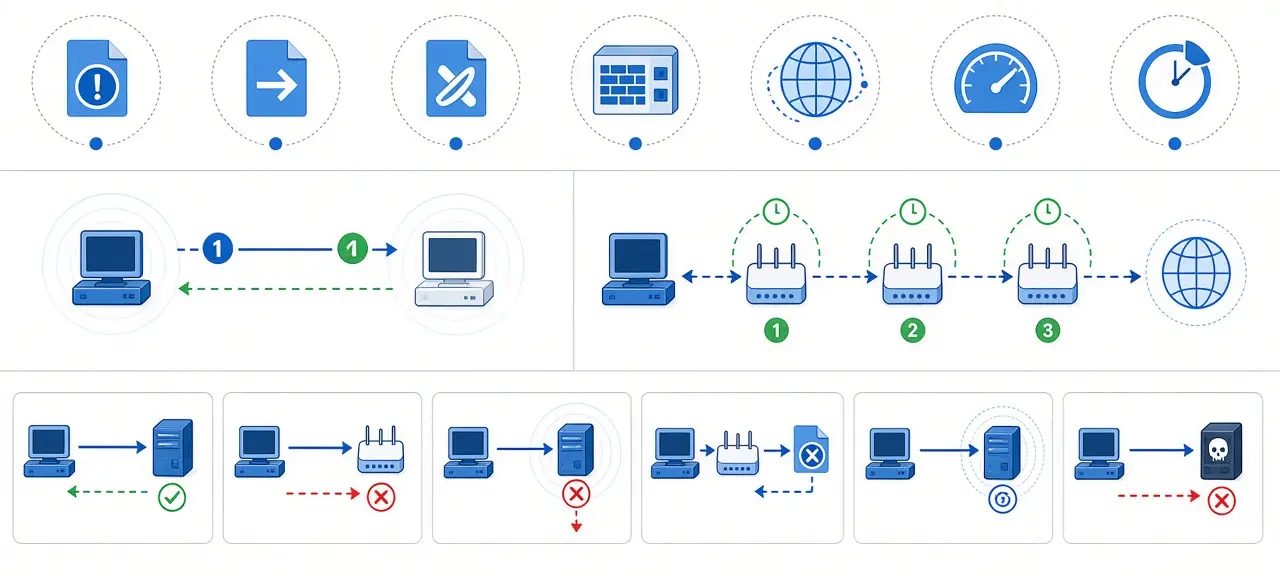
The ICMP protocol (Internet Control Message Protocol) is the part of IP that routers and hosts use to report delivery problems and answer test requests, such as "destination unreachable" or the echo reply that makes ping work. It carries no application data and has no port numbers. ICMP rides directly inside IP packets as IP protocol number 1, and IPv6 has its own version, ICMPv6. Most people meet it through ping and traceroute, where each line printed is an ICMP message or the lack of one.
What is the ICMP protocol?
ICMP is the control protocol that IP hosts and routers use to send error reports and diagnostic replies back to the source of a packet. RFC 792, written by Jon Postel in September 1981, defines it. ICMP uses IP as if it were a higher-level protocol, yet the RFC calls it "an integral part of IP" that every IP device must support.
Its job is to report, not to repair. RFC 792 says the purpose of these messages is to give feedback about problems, "not to make IP reliable." ICMP never resends a lost packet. TCP does that on its own. ICMP works at the network layer (layer 3), the same layer as IP. In the IPv4 header, the Protocol field is 1 for ICMP, and ICMPv6 uses Next Header value 58.
People often ask whether ICMP is TCP or UDP. It is neither, and the differences are easy to see side by side.
| ICMP | TCP / UDP | |
|---|---|---|
| Port numbers | None | Yes, 0 to 65535 |
| Connection | None | TCP opens one, UDP does not |
| Carries app data | No | Yes |
| Typical use | Errors and diagnostics | Web pages, games, DNS |
Ports belong to the transport layer, which is why the guide to TCP and UDP ports never has an entry for ICMP.
How ICMP works: what an ICMP message contains
An ICMP message sits in the data area of an IP packet. A router sends one when it can't forward a packet, a destination host sends one when nothing there handles the packet, and any host sends an Echo Reply when it gets an Echo Request. Every message starts with the same 4-byte header.
- Type (8 bits): the kind of message, for example 3 for Destination Unreachable.
- Code (8 bits): the detailed reason inside that type.
- Checksum (16 bits): detects bits damaged in transit. It is an error check, not a security feature, and it proves nothing about who sent the message.
- The rest depends on the type. An Echo message holds an Identifier and a Sequence Number.
Error messages also carry a copy of the original packet's IP header plus the first 64 bits of its data, as RFC 792 specifies. Those 8 bytes hold the TCP or UDP source and destination ports. That is how your operating system knows which app's connection the error belongs to.
A few rules stop ICMP from making problems worse. RFC 1122 (section 3.2.2) says an ICMP error message must not be sent in response to another ICMP error, to a packet sent to a broadcast or multicast address, or to a non-initial fragment. The same RFC says every host must implement an Echo server, so answering ping is the default behavior that firewalls later switch off. For IPv6, RFC 4443 requires every node to limit the rate of the ICMPv6 error messages it sends.
ICMP message types and codes
ICMP message types fall into two groups: error messages such as Destination Unreachable and Time Exceeded, and query messages that come in request and reply pairs, such as Echo Request and Echo Reply. The ICMP type and code together name one exact situation, so type 3 code 3 always means "port unreachable."
| Type | Name | Common codes | Where you see it |
|---|---|---|---|
| 0 | Echo Reply | 0 | A ping that got an answer |
| 3 | Destination Unreachable | 0 net, 1 host, 2 protocol, 3 port, 4 fragmentation needed and DF set, 5 source route failed, 13 communication administratively prohibited | "Destination host unreachable" in ping; code 3 is how a host says a UDP port is closed; code 4 drives Path MTU Discovery; code 13 means a filter dropped the packet |
| 5 | Redirect | 0 to 3 | A router telling a host that another gateway on the same network has a better route |
| 8 | Echo Request | 0 | The packet ping sends |
| 11 | Time Exceeded | 0 TTL exceeded in transit, 1 fragment reassembly time exceeded | Traceroute hops; "TTL expired in transit" in ping |
| 12 | Parameter Problem | 0 pointer indicates the error | A packet with a broken IP header |
The ICMP echo code is 0 in both directions: Echo Request is type 8 code 0, and Echo Reply is type 0 code 0. Codes 0 to 5 of Destination Unreachable come from RFC 792, and code 13 was added by RFC 1812 for routers that block traffic on purpose.
Some types are gone. RFC 6633 (May 2012) retired type 4, Source Quench, and states that "a host MUST NOT send ICMP Source Quench messages." RFC 6918 (April 2013) formally deprecated types 6, 15 to 18 and 30 to 39, including the old Information and Address Mask messages. Timestamp (13) and Timestamp Reply (14) are still active in the registry, but ordinary networks rarely need them. The full list lives in the IANA ICMP parameters registry.
How ping uses ICMP
Ping sends an ICMP Echo Request (type 8) to a target and waits for an Echo Reply (type 0). The reply carries the same Identifier and Sequence Number as the request, so ping can pair them up. The time between sending the request and receiving the matching reply is the round-trip time ping prints.
When the answer is not a normal reply, the line ping prints tells you which ICMP message came back. These are the Windows wordings. Linux prints similar text, such as "Destination Host Unreachable" and "Time to live exceeded".
- "Reply from 8.8.8.8: bytes=32 time=21ms TTL=118": an Echo Reply arrived.
- "Reply from 192.168.1.23: Destination host unreachable.": some device sent type 3 back. The address after "Reply from" is the device that reported the error, often your own PC when a LAN target doesn't answer. It is not the target.
- "Request timed out.": nothing came back. ICMP gives no reason here. The target may drop Echo Requests, or a packet may have been lost on the way.
- "Reply from 10.0.0.1: TTL expired in transit.": a router sent Time Exceeded (type 11), usually because of a routing loop.
ICMP is the usual way to ping, not the only one. A web page can't send raw ICMP, so browser speed tests time HTTP requests instead, and some tools ping with a TCP connection to a port. The CheckIP ping test runs from our server to the target, so it measures that path, not your Wi-Fi. To check whether a fault is inside your home, start with the three pings to your gateway, DNS and a public IP.
How traceroute uses ICMP Time Exceeded
Traceroute finds every router on a path by sending packets with a TTL of 1, then 2, then 3. Each router lowers the TTL by one. The router that brings it to 0 drops the packet and sends back ICMP Time Exceeded (type 11, code 0), and that reply reveals its address.
- The first probe leaves with TTL 1. Your home router drops it and returns Time Exceeded, so hop 1 is usually your router.
- The next probe leaves with TTL 2 and expires at your ISP's first router, which reports itself the same way.
- The TTL keeps rising by one per hop until a probe reaches the destination.
- The destination answers with a different message: an Echo Reply for ICMP probes, or Port Unreachable (type 3, code 3) for UDP probes. Traceroute stops there.
The probe type depends on the system. Windows tracert sends ICMP Echo Requests, tries up to 30 hops and waits 4,000 ms for each reply, according to Microsoft Learn. Linux traceroute sends UDP packets to ports starting at 33434 by default. Its man page lists -I for ICMP Echo and -T for TCP SYN, which helps when a firewall drops one kind of probe.
A row of * * * means no reply arrived in time for that hop. Microsoft's documentation says "a row of asterisks (*) is displayed for that hop" in that case. Many routers rate-limit or skip Time Exceeded messages. If later hops still answer, the path is not broken at that router.
ICMPv6: why IPv6 needs ICMP to work
ICMPv6, defined in RFC 4443 (March 2006), is the IPv6 version of ICMP and uses Next Header value 58. It reports errors the same way. It also does jobs that IPv4 gives to other protocols: Neighbor Discovery (RFC 4861, types 133 to 137) replaces ARP and carries the router advertisements devices use to set their own addresses.
| Type | Name | Group |
|---|---|---|
| 1 | Destination Unreachable | Error (types 0 to 127) |
| 2 | Packet Too Big | Error |
| 3 | Time Exceeded | Error |
| 4 | Parameter Problem | Error |
| 128 | Echo Request | Informational (types 128 to 255) |
| 129 | Echo Reply | Informational |
The numbers differ from IPv4: Time Exceeded is 3 in ICMPv6 but 11 in ICMP. IPv6 routers never fragment packets. When a packet is too large for the next link, the router drops it and returns Packet Too Big, and the sender must shrink its packets. The header and fragmentation changes are covered in IPv4 vs IPv6.
Should you block ICMP?
Block ICMP selectively, never completely. Dropping unsolicited Echo Requests from the internet is a normal choice. Dropping the error messages that report unreachable hosts, oversized packets and expired TTLs breaks ordinary connections in ways that are hard to trace.
Many servers and routers ignore ping on purpose. It makes simple address sweeps less useful and cuts the load from ping floods. The old "ping of death" bug, which crashed systems with malformed oversized packets, was patched in operating systems long ago. Many home routers have a setting to answer or ignore ping on the WAN side.
The cost of blocking everything is Path MTU Discovery. RFC 1191 (November 1990) has hosts send packets with the Don't Fragment bit set and lower their packet size when a router returns type 3 code 4. IPv6 relies on Packet Too Big for the same job, and RFC 4890 lists it among the ICMPv6 messages a firewall must not drop. Without these messages, large packets vanish silently. Pages start loading and then stall, and VPN tunnels drop traffic. The usual name for this failure is a PMTUD black hole.
A sensible policy lets these through and rate-limits the rest:
- Destination Unreachable, including Fragmentation Needed (ICMP type 3)
- Packet Too Big (ICMPv6 type 2)
- Time Exceeded and Parameter Problem, in both versions
- Echo Request and Echo Reply as your policy decides, ideally with a rate limit
Blocking ping does not hide a server. Services still answer on their ports, and scanners such as Nmap can skip the ping step entirely. To see what a device really exposes, check which ports are open.
Allow or block ping on Windows
Windows Defender Firewall controls ping with two inbound rules. Press Win+R, type wf.msc and open Inbound Rules. Find "File and Printer Sharing (Echo Request - ICMPv4-In)" and its ICMPv6-In twin. Right-click a rule and choose Enable Rule or Disable Rule. Each rule exists per network profile, so you can allow ping on Private networks and keep it off on Public Wi-Fi. There is no need to turn the whole firewall off.
Frequently asked questions
What port does ICMP use?
ICMP uses no port at all. Firewalls match it by protocol and by ICMP type and code instead. The "port 7" you may see in old guides is the Echo service from RFC 862, which runs over TCP and UDP. It is a different thing from ICMP Echo, even though both send back what they receive.
Is ping the same as ICMP?
No. ICMP is a protocol with dozens of message types, and ping is one program that uses two of them, Echo Request and Echo Reply. Traceroute, Path MTU Discovery and IPv6 Neighbor Discovery use other ICMP messages. Some ping tools skip ICMP and time a TCP connection or an HTTP request instead.
Is ICMP TCP or UDP?
Neither. ICMP sits directly on IP, so firewall rules name it as its own protocol. In Windows Firewall you pick ICMPv4 or ICMPv6 as the protocol type, and Linux tools such as iptables use "-p icmp". A rule written for TCP or UDP never matches ICMP traffic.
Is ICMP a security risk?
The real risks are discovery and load. Echo replies confirm that an address is in use, and a flood of requests can eat bandwidth. Rate limits and filtering unsolicited requests at the network edge handle both, without the breakage of blocking every ICMP message.
Why does a website load but not answer ping?
The server or its firewall drops Echo Requests, while the web server still answers on port 443. Ping and the web server are separate services, so one can be off while the other works. A ping timeout alone says nothing about whether the site is up.